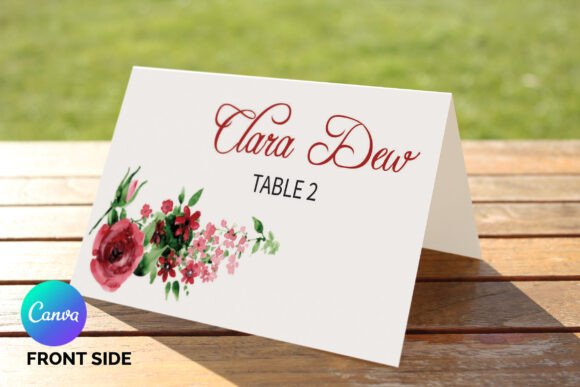
Wedding Place Card Template: Elevating Table Settings with Editable Floral Designs
The final touches of wedding stationery often carry the most weight in shaping guest experience. While invitations set the initial tone, it is the place card that guides attendees to their seat and signals the level of thoughtfulness invested in the event. A well-executed wedding place card template bridges the gap between logistical necessity and aesthetic expression. In an era where couples and independent designers seek professional results without prohibitive costs or extended timelines, editable digital templates have become a cornerstone of modern event planning. Specifically, floral designs available for Microsoft Word and Adobe InDesign offer a versatile solution that accommodates both novice users and seasoned professionals.
This shift toward accessible design tools reflects a broader change in how we approach creative projects. The days of relying exclusively on expensive custom printing services are evolving into a hybrid model where high-quality assets are purchased once and customized indefinitely. For weddings, this means achieving a cohesive botanical theme through instant downloads that are fully editable, affordable, and ready for immediate production. Understanding how to leverage these resources effectively can transform a simple seating assignment into a memorable keepsake that reinforces the overall visual narrative of the celebration.
The Role of Botanical Aesthetics in Modern Stationery
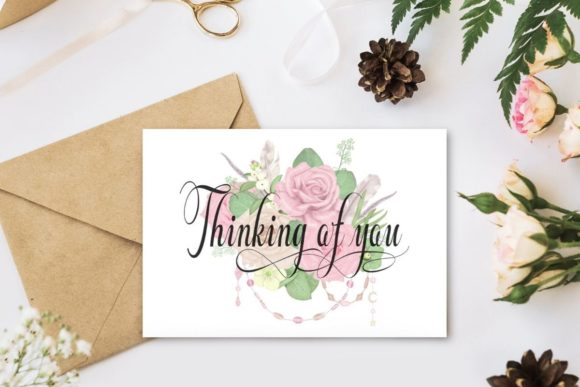
Floral motifs remain a dominant force in wedding design because they possess a timeless adaptability that few other elements can match. However, the application of florals has shifted from heavy, ornate borders to more organic, airy compositions that allow typography to breathe. A floral wedding place card template capitalizes on this trend by providing pre-designed artwork that balances decorative elements with functional whitespace. This balance is critical; the primary purpose of the card is legibility, and the secondary purpose is beauty. When these two priorities are misaligned, guests struggle to find their names, defeating the object entirely.
Current market preferences favor designs that feel handcrafted yet polished. Digital templates achieve this by utilizing high-resolution vector art or watercolor scans that retain texture even when printed at home or via local vendors. The relevance of these templates extends beyond mere decoration. They serve as a unifying thread connecting the invitation suite, table numbers, menus, and favors. By utilizing a consistent floral template across these items, planners create a seamless visual journey. The availability of these assets as instant downloads ensures that last-minute additions or corrections can be made without disrupting the established design language, a flexibility that traditional print shops rarely offer.
Adapting to Diverse Workflows: Word vs. InDesign
One of the most significant advantages of modern template ecosystems is software agnosticism. Not every bride, groom, or freelance designer owns or knows how to use Adobe InDesign. Conversely, many professionals refuse to work in Microsoft Word due to its limitations in layout precision. Providing files in both formats acknowledges the diverse technical realities of today’s users. This dual-format approach democratizes design, ensuring that quality is not gatekept by software proficiency.
For the Microsoft Word User
The MS Word 2007-2013 DOCX file included in this package is optimized for accessibility. Word is ubiquitous, and most users possess at least a foundational understanding of its interface. For those managing their own wedding stationery, this format removes the learning curve associated with professional layout software. Users can simply open the document, select text with the standard text tool, and replace placeholder content with guest details. The template maintains structural integrity, preventing common formatting disasters like shifting margins or broken image links that often plague DIY attempts. This makes the wedding place card template genuinely easy to use for individuals who want professional aesthetics without professional training.
For the Adobe InDesign Professional
For designers, marketers, or detail-oriented planners, the InDesign files (CS6 INDD and CS4 IDML) offer granular control. These working files allow for precise typographic adjustments, color grading of floral elements, and integration with data merge features for bulk editing. The inclusion of the IDML format ensures backward compatibility, allowing users with older versions like CS4 to access the template without upgrade pressure. This flexibility supports professional workflows where brand consistency and print-ready specifications are non-negotiable. Designers can modify layer structures, adjust bleed settings, or swap floral assets while retaining the original template's robust architecture.
Technical Specifications and Print Readiness
Aesthetic appeal must be matched by technical accuracy. A beautiful template that prints incorrectly is functionally useless. This specific resource is engineered with standard industry dimensions to ensure compatibility with commercial printers and home setups alike. The size specification of 3.5 x 4 inches unfolded and 3.5 x 2 inches folded adheres to standard tent card sizing. This dimension is crucial for stability; cards that are too tall may topple, while those that are too small may be overlooked amidst glassware and centerpieces.
Understanding file specifications prevents costly reprints. The template includes proper bleed and safe zones, though users should always verify their printer’s specific requirements. Because this is an instant download and not a physical mockup, the user assumes responsibility for print settings. Selecting the correct paper weight is equally important. Standard copy paper will not support a folded tent card adequately. Cardstock ranging from 80lb to 110lb cover weight is recommended to ensure the card stands upright and feels substantial to the touch. The digital nature of the product allows for test printing on various papers before committing to a full run, a cost-saving measure impossible with pre-printed stationery.
Customization Best Practices and Typography
While the template provides the structure, customization determines the final outcome. The help file includes download links for the specific fonts used in the design, ensuring that the user’s version matches the intended aesthetic. Font selection is not merely stylistic; it impacts readability and mood. If changing fonts, users should prioritize typefaces that complement the floral artwork rather than compete with it. Script fonts work beautifully for names but should be avoided for table numbers or dietary indicators where clarity is paramount.
Editing text requires attention to hierarchy. The guest’s name should be the largest element, followed by the table number. Using the text tool to replace content is straightforward, but maintaining alignment is key. Center-aligned text typically works best for tent cards, as it remains balanced regardless of name length. For users working in Word, utilizing paragraph styles rather than manual formatting ensures consistency across hundreds of cards. In InDesign, master pages can streamline this process further. The goal is to create a system where updating information does not require redesigning the layout each time.
Economic and Practical Implications of Instant Downloads
The decision to use an editable template is often driven by budget, but the value proposition extends beyond savings. Traditional custom stationery involves multiple proofing rounds, shipping delays, and minimum order quantities that often result in waste. An affordable, instant download eliminates these friction points. For entrepreneurs and freelancers offering wedding services, these templates enable rapid turnaround times and higher profit margins. Instead of billing for hours of custom design work, professionals can bill for customization and project management, passing the material savings onto clients while maintaining healthy margins.
Furthermore, the "instant" aspect addresses the compressed timelines characteristic of modern event planning. Venues are booked later, and decisions are made faster. Having immediate access to a high-quality floral wedding place card template allows planners to keep pace with accelerated schedules. It also facilitates last-minute changes—a guest cancellation or table rearrangement the morning of the event can be resolved in minutes rather than requiring a frantic call to a printer. This agility is a defining feature of contemporary digital assets, aligning perfectly with the dynamic nature of live events.
Sustainability and Waste Reduction
Digital templates inherently support more sustainable practices. By enabling precise print-on-demand production, they eliminate the overage typical of bulk offset printing. Users print exactly what they need, plus a small contingency, rather than rounding up to meet vendor minimums. Additionally, the ability to reprint individual cards reduces the likelihood of discarding entire batches due to minor errors. From a lifestyle perspective, this aligns with the growing preference for mindful consumption among millennials and Gen Z couples. Choosing a reusable digital asset over single-use custom plates reflects a conscientious approach to celebration that resonates with current cultural values.
The longevity of the file also contributes to sustainability. Unlike a physical sample that ends up in landfill, the digital template can be archived and repurposed. A floral design used for a wedding could be adapted for anniversary parties, bridal showers, or even business events years later. This reusability maximizes the return on investment and reduces the cumulative environmental footprint of future events. As consumers become increasingly aware of the lifecycle of their purchases, products that offer durability and adaptability gain distinct market advantage.
Navigating the Editing Process Successfully
To maximize the utility of this template, users should adopt a methodical editing workflow. Begin by organizing guest data in a spreadsheet before opening the design file. Clean data prevents formatting errors during entry. Next, download and install all linked fonts prior to editing; missing fonts are the most common cause of layout shifts. Always save a master copy of the blank template before making any changes. This preserves the original asset for future use or error recovery.
When replacing text, pay attention to kerning and leading, especially with script fonts. Automated spacing often fails with decorative typefaces, requiring manual adjustment to prevent overlapping letters or awkward gaps. Test print a single sheet on the intended paper stock to check color accuracy and alignment. Home printers often have non-printable margins that differ from screen previews; adjusting the template scale slightly may be necessary to accommodate hardware limitations. Finally, score fold lines before creasing to ensure crisp, professional edges. These practical steps distinguish a polished result from an amateur attempt, validating the choice of a premium template over a free alternative.
Ultimately, the intersection of technology and tradition in wedding stationery represents a maturation of the DIY market. Tools like this InDesign and MS Word template empower users to act as their own art directors, providing professional-grade foundations upon which personal visions can be built. Whether for a single intimate gathering or a portfolio of client events, the capacity to instantly access, edit, and produce high-quality floral place cards satisfies the modern demand for speed, beauty, and autonomy. By understanding both the creative potential and technical requirements of these assets, users can ensure that every seat at the table tells a story of intentional, accessible design.